

FMS · Corporate budgeting software
Budget, forecast and reforecast in a single workflow, line by line.
FMS is Praeskius's corporate budgeting software. FP&A and controllership teams use FMS to run budget, forecast and reforecast with line-by-line visibility, automatic inflation and exchange rate calculation, and integration with SAP, Protheus and Oracle.
Who it's for
FP&A, controllership and finance leaders at mid-sized and large companies.
What it replaces
Excel in the budgeting process. It doesn't replace your ERP or BI: it works with both.
What sets it apart
Line-by-line visibility, multiple currencies, automatic inflation and FX, AISC for mining.
Spreadsheet budgets get the number right, but can't explain it
Parallel versions, manual checks and rework at every revision.
Little visibility
Totals that don't reveal what's behind them.
Fragile control
The process depends on people, not on a structure.
Late decisions
Every adjustment means rework; the answer comes too late.
Meet CintIA, the FP&A analyst that works inside FMS
CintIA reads the data from the active round and delivers the analysis whenever you need it. Ask in plain language; she answers with the numbers from your budget.
- Automatic analysis of the largest forecast variances
- Drafted explanations based on the round's numbers
- Line search and on-demand dashboards
- Alerts for approvals due today
- Calendar integration to prepare meetings with cost center owners: numbers, variances and agenda ready to go

She suggests and drafts, never approves. Every save asks for your confirmation, approvals stay human, and every number she cites links to the screen it came from. She only sees what your user can already see.
How it works, stage by stage
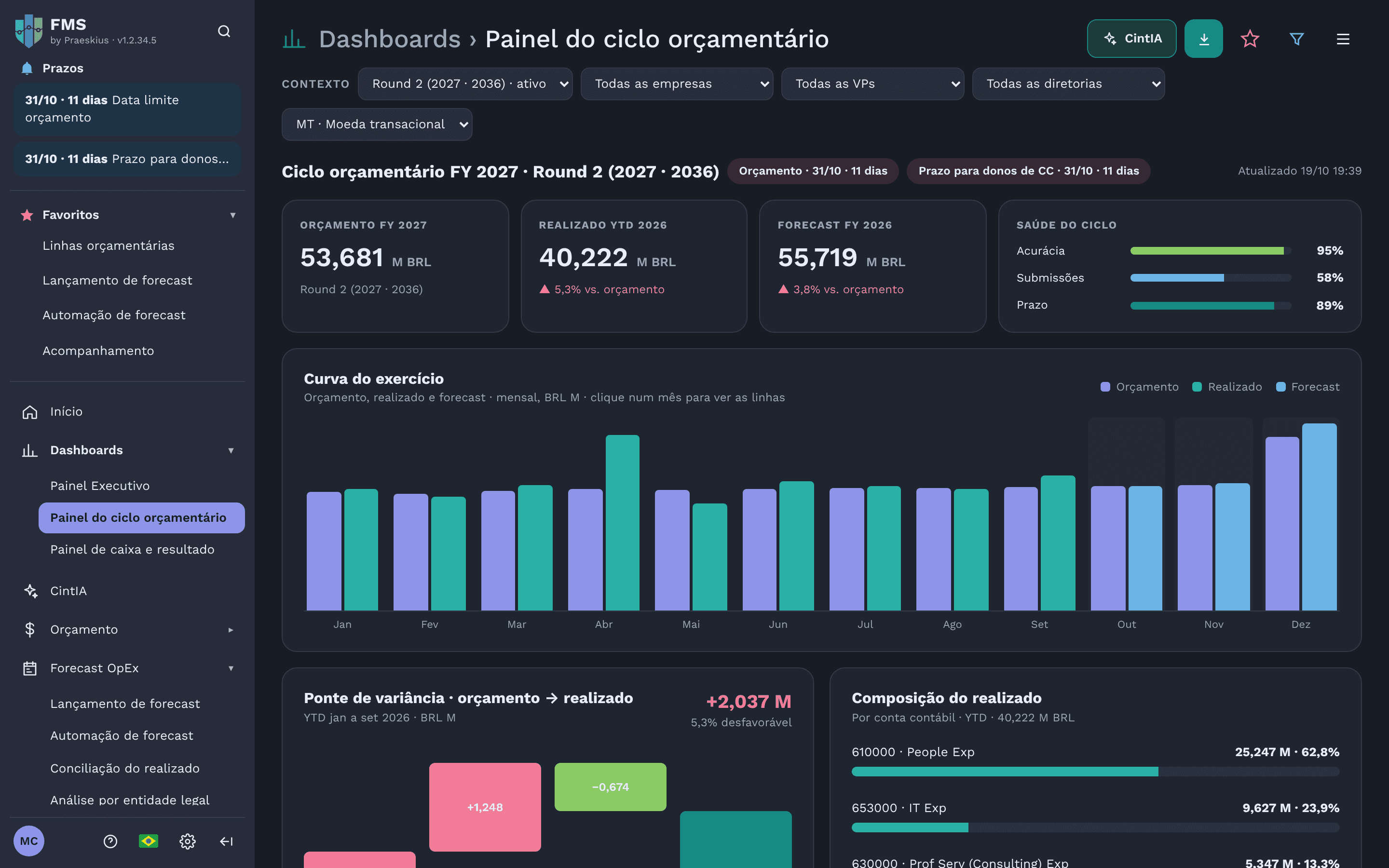
Pick a stage of the budget cycle to see how FMS handles it.
An OpEx cycle with roles, deadlines and rounds
Define who enters, who approves and by when. Input via form, in bulk or through Excel, with exchange rates already applied.
- Roles and approval workflow by cost center
- Input via form, in bulk or Excel
- Deadlines, review rounds and exchange rates
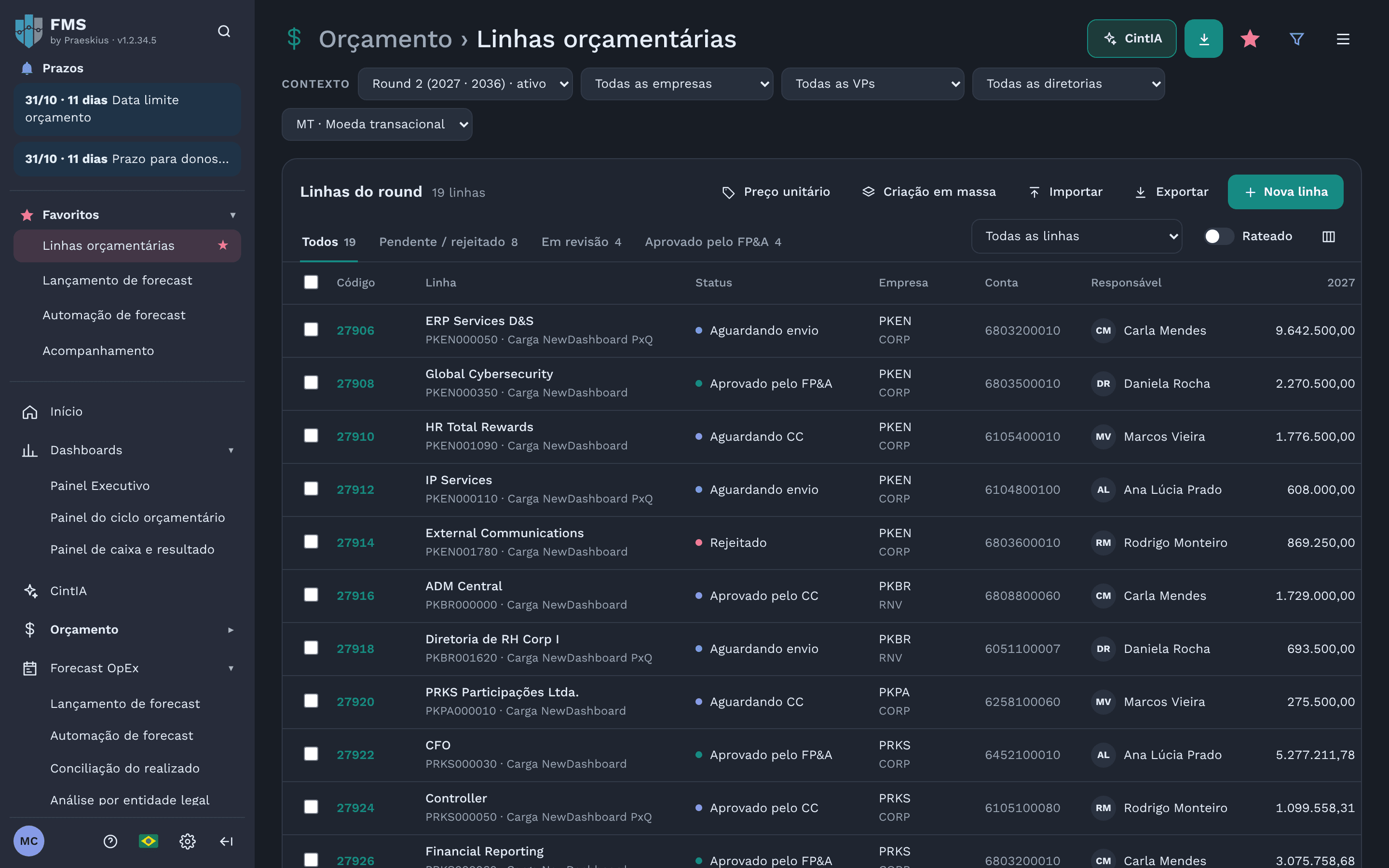
Investment projects from setup to approval
Register projects, set capitalization and depreciation rules, and approve CapEx within the same budget workflow.
- Investment project registry
- Capitalization and depreciation rules
- Step-by-step approval
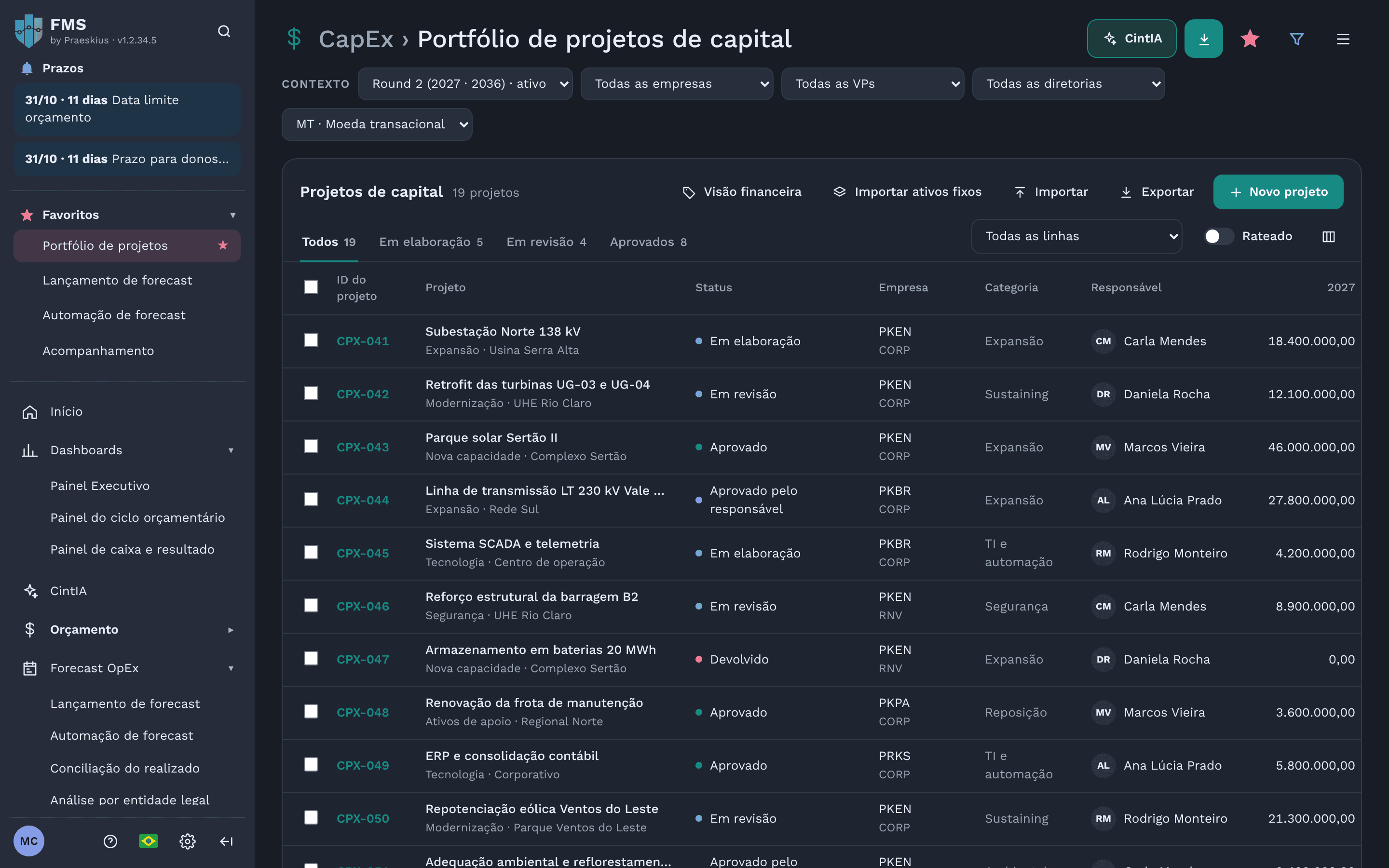
Replan the year without opening another file
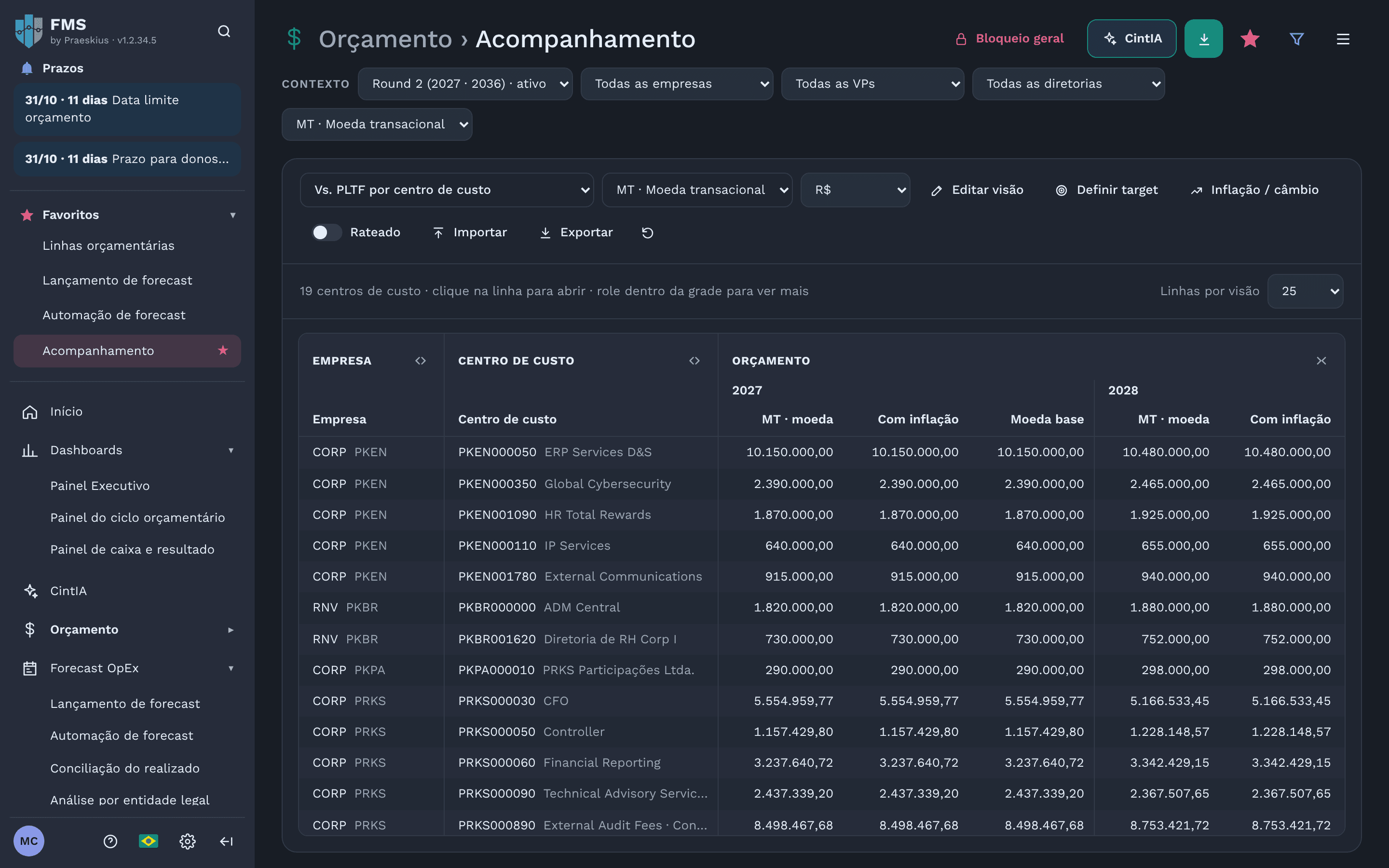
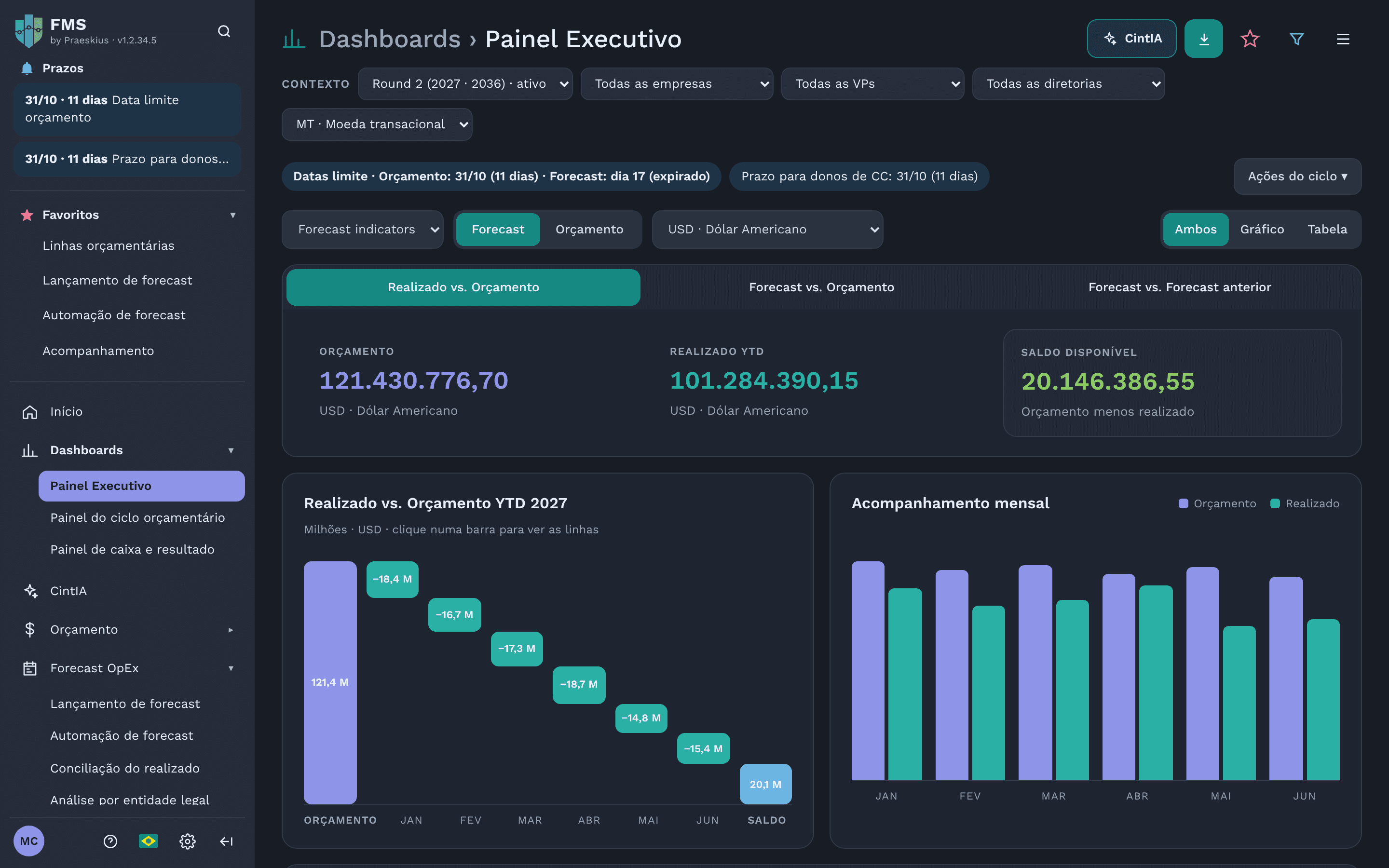
Compare budget, forecast and actuals in the same system as the budget, across multiple currencies.
- Budget vs. forecast vs. actuals
- Full-year replanning
- Multiple currencies
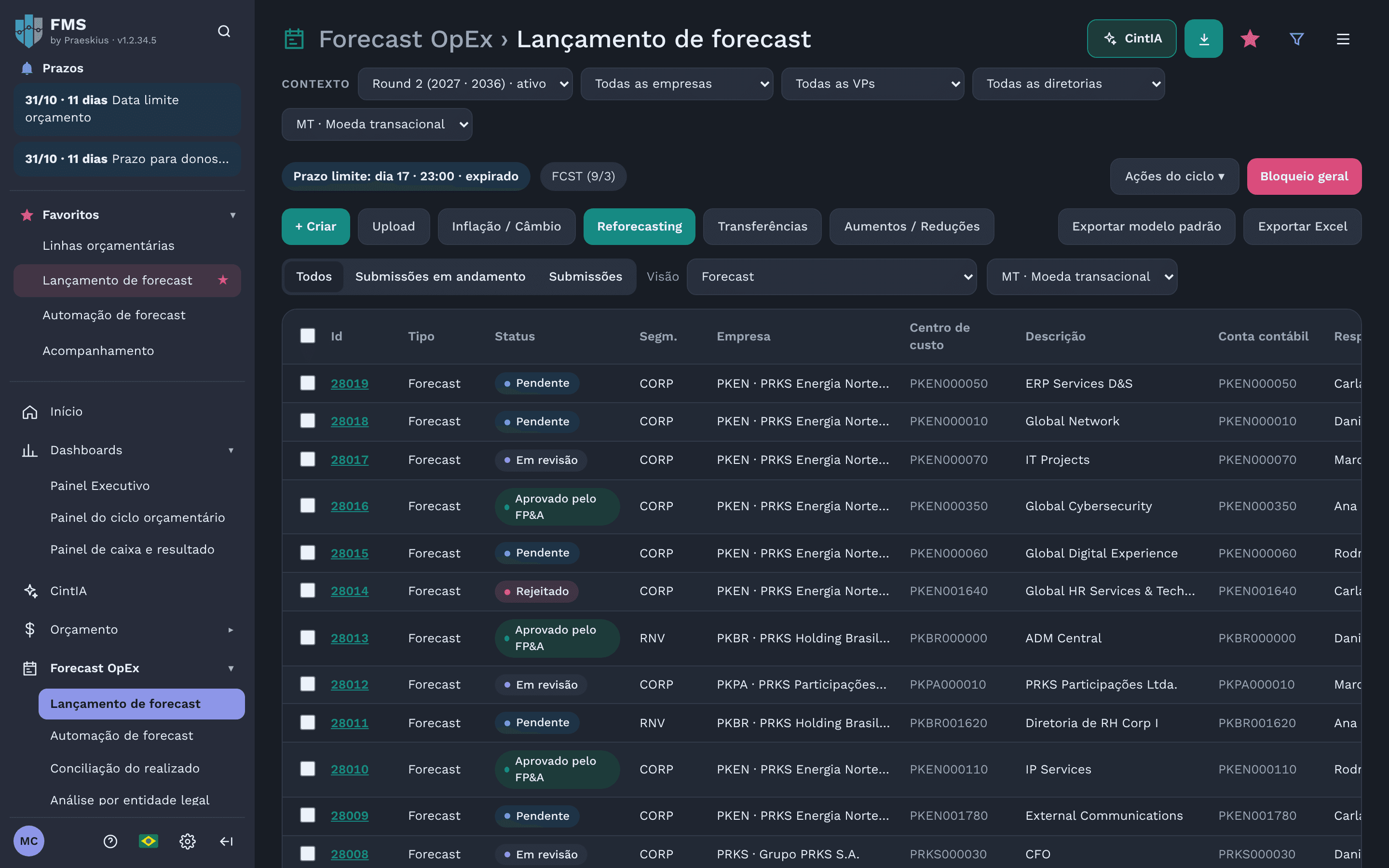
Monthly review with FP&A approval
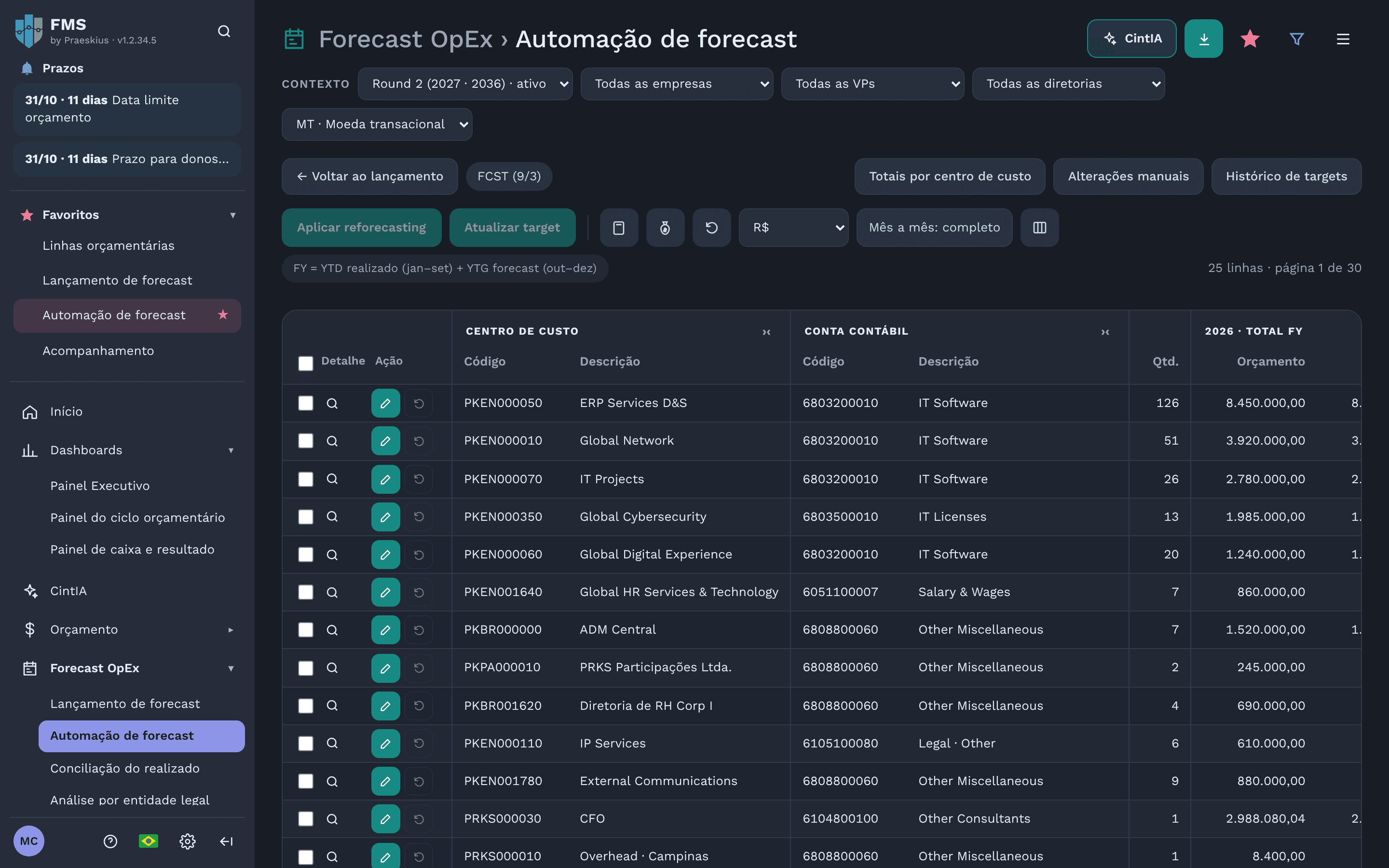
Monthly input and review, forecast vs. budget reports and automated reforecasting.
- Monthly input and review
- Forecast vs. budget reports
- Automated reforecast
Inflation and exchange rates calculated for you
FX and inflation assumptions applied automatically to every line, in any currency.
- Centralized assumptions
- Automatic recalculation
- Multi-currency consolidation
Far beyond expense budgeting
Four modules that take FMS from OpEx all the way to cash, the margin of every product and the explanation behind every number.
Matrix expense management (GMD)
Every expense with an owner, a target and a recorded negotiation
GL accounts are grouped into packages (payroll, travel, IT, consulting), each with an accountable owner and a target set against the prior-year baseline. FMS crosses package and cost center and shows exactly where the proposal went over target.
- Package × cost center matrix with target and proposal at every intersection
- Four-step budget negotiation: proposed, challenged, justified and approved
- Monthly tracking with traffic lights and a mandatory action plan when off target
- Cost center variance ranking within each package
For companies that use matrix expense management (GMD), zero-based budgeting (ZBB) or cost-reduction targets

Cash flow, cash flow statement and P&L
From budget to cash and P&L, in the same tool
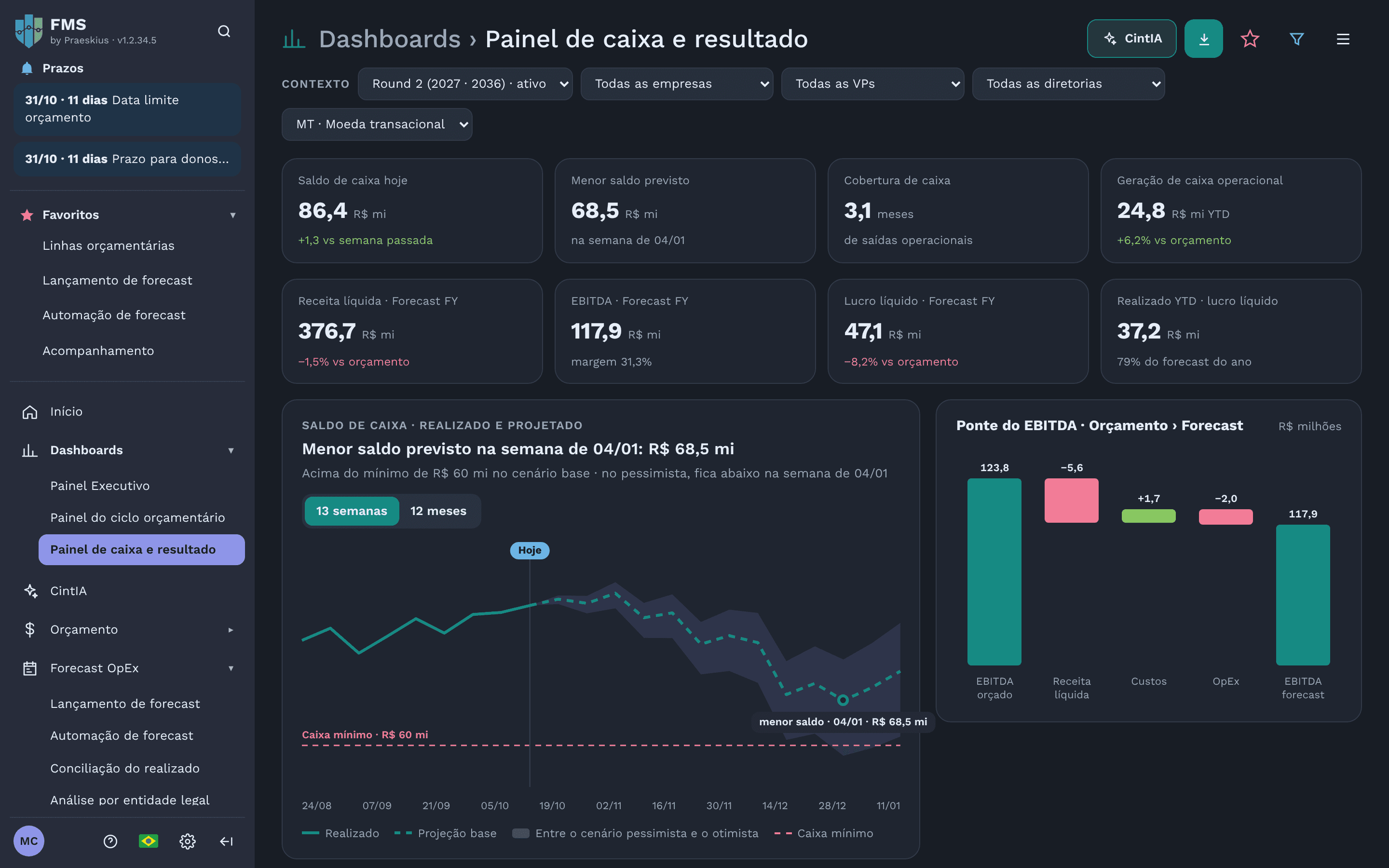
FMS projects the cash balance week by week and builds the cash flow statement and the management P&L from the same budget and actuals. If cash is going to get tight, you see it first.
- 13-week or 12-month cash flow forecast, with scenarios and minimum cash alerts
- Scenario simulation: late receivables, revenue swings and deferred CapEx
- Cash flow statement using the direct and indirect methods, with forecast vs. budget
- Management P&L by company, product family, channel or SKU, already in the format of Brazil's tax reform
For CFOs and treasury teams who need to connect budget, cash and results
Volume, price, cost and margin by product
Revenue and margin planned by product, channel and family
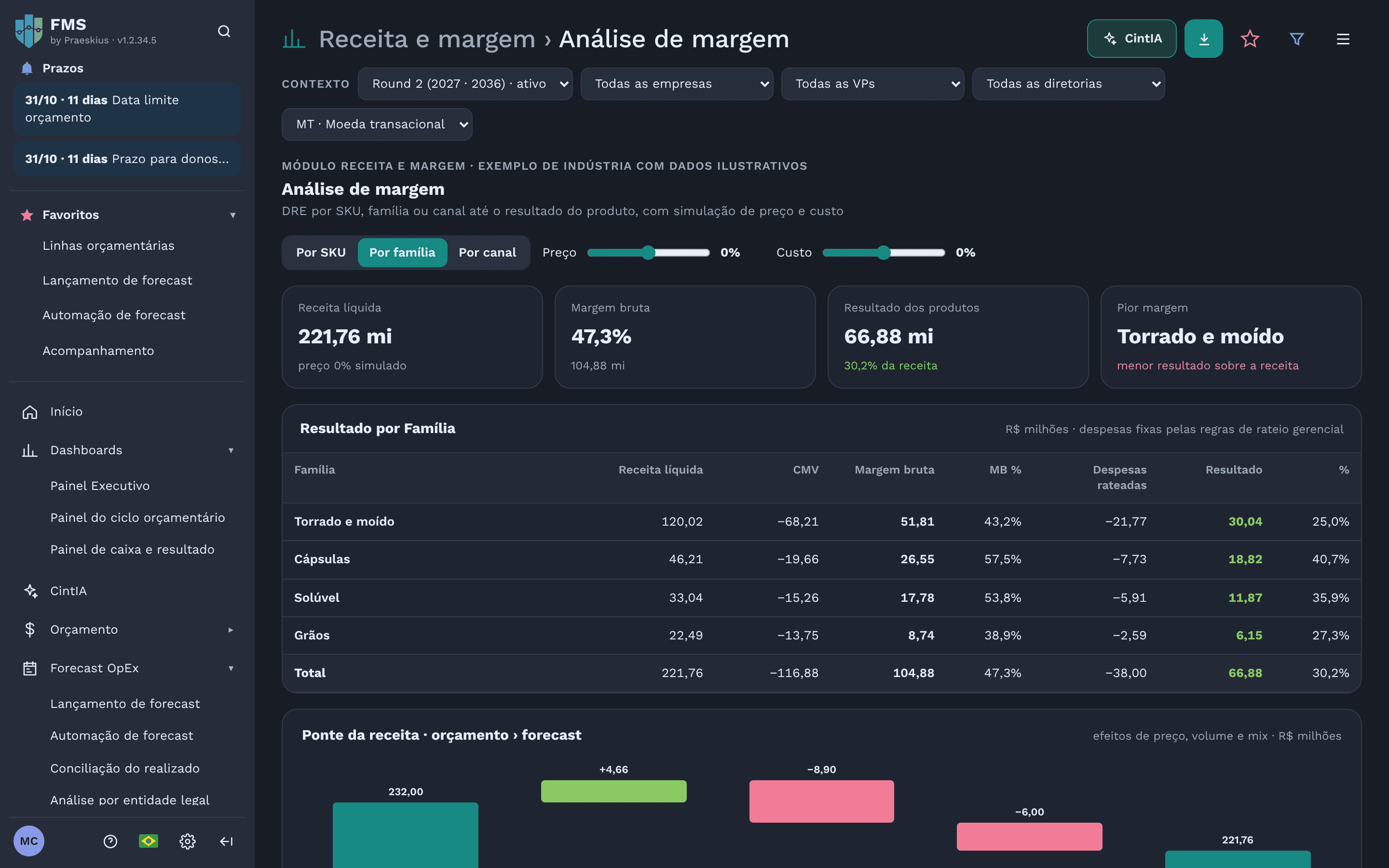
For companies that sell products, the budget starts with volume and price. FMS plans revenue by SKU and channel, builds the cost sheet and shows the result of each product, with price and cost simulation.
- Volume and price planning by SKU and channel
- Cost sheet by SKU (COGS) and management allocation of fixed expenses
- P&L by SKU, family or channel down to product profitability
- Revenue bridge: price, volume and mix effects
For manufacturing and retail
Automatic variance explanations
Variances explained before the results meeting
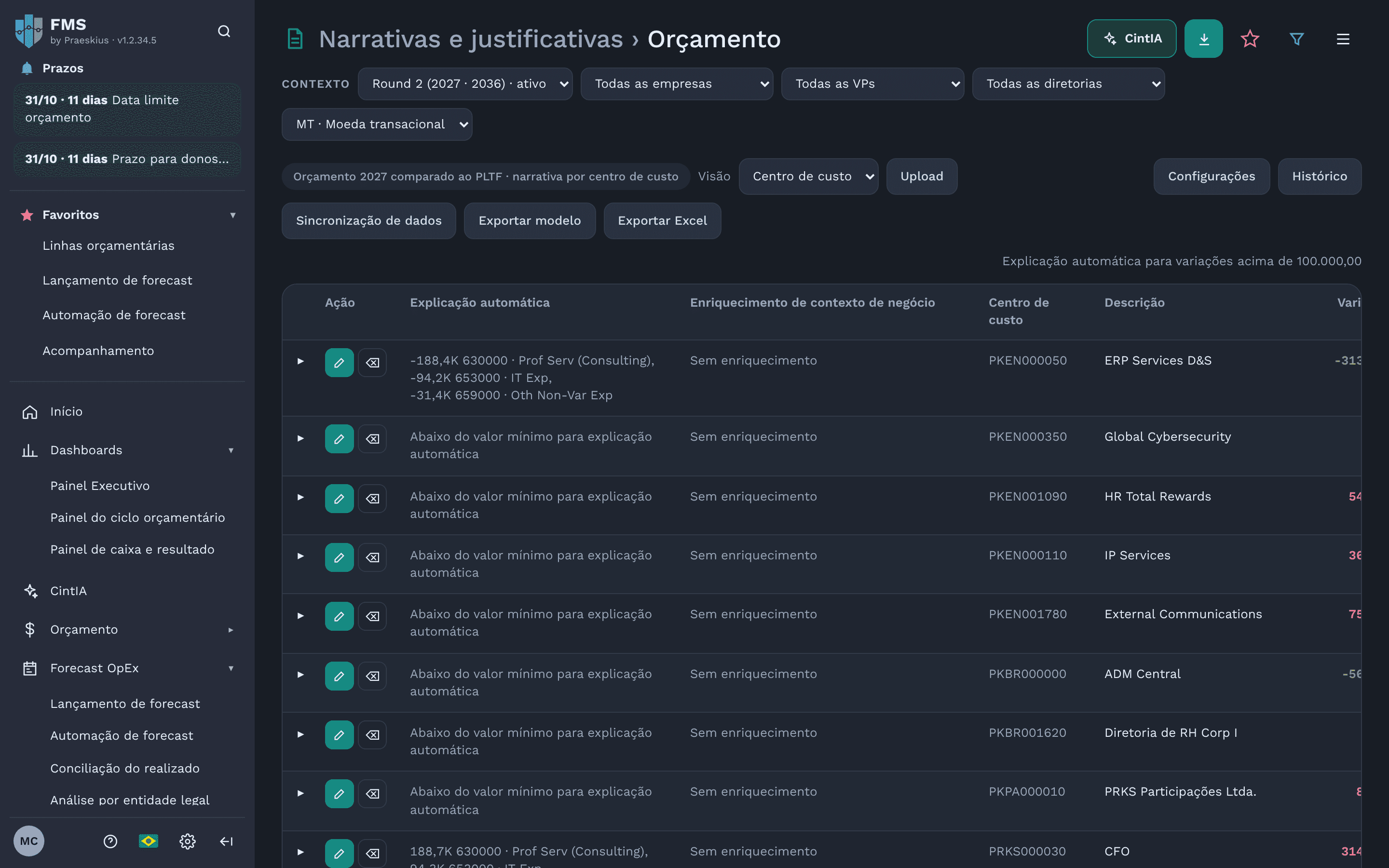
FMS compares the budget with the long-range plan, the forecast with the target and actuals with each package, and automatically explains variances above the threshold you set, pointing to the accounts that weighed most. Your team only adds the business context.
- Automatic explanation of variances above a configurable threshold
- Drill-down into the GL accounts that best explain each variance
- Business context enrichment with authorship history
- Covers budget, forecast and packages, with export to Excel
For FP&A and controllership teams who close the month explaining the numbers
What FMS solves
Process and governance
- A standardized, centralized budgeting process
- Approval workflow with controls for governance
- Fewer inconsistencies and operational risks
Visibility and analysis
- Line-by-line budget, by account and cost center
- Scenario analysis and projections
- Budget, forecast and reforecast on the same base
Collaboration
- Real-time tracking across all departments
- A single database, no fragmented workflows
- Less rework and manual version reconciliation
Currencies and calculations
- Automatic inflation and FX adjustments
- Multi-currency budgeting consolidated in the base currency
- Centralized macroeconomic assumptions
Mining module
Production-based budgeting and AISC, no side spreadsheets
FMS builds the budget from production assumptions (material moved, grade and recovery), calculates personnel, materials and services by area, and delivers AISC.
See FMS for mining- Total AISC
- R$
- per tonne
- US$/t
- per ounce
- US$/oz
Integrates with your ERP
Established integrations with SAP, Protheus and Oracle, and with any ERP that has a structured chart of accounts. The ERP records; FMS plans.
- SAP
- Protheus
- TOTVS RM
- Oracle
- Microsoft Dynamics 365
- Sankhya
- Senior Sistemas
- CIGAM
- Infor
- IFS
- Linx
- + other ERPs
- BI via connector
“I'm very happy with the system; it's helping me enormously in my budgeting routine. Beyond the tool being excellent and complete, the service, the attention to detail and the immediate response to every request I make are off the charts!”
 Laura Pires · Finance, P.A Gold
Learn more
See FMS in detail
Forecast and reforecast
Run forecast and reforecast in the same system as your budget: compare budget, forecast and actuals, replan the year and work in multiple currencies.
View pageFMS vs. spreadsheets
Compare FMS with spreadsheet budgeting: versions, consolidation, forecast, exchange rates and ERP integration. See when to replace the spreadsheet.
View pageFrequently asked questions about FMS
Who is FMS for? What does it do?
FMS is designed for FP&A teams, controllership, and financial leaders who need predictability and structure in the budgeting process. It organizes financial planning, enables forecasting and scenario analysis, centralizes information, and increases the reliability of financial insights.
Does FMS replace the Excel budget spreadsheet?
FMS does not replace Excel entirely, but it replaces Excel as the core budgeting process. It structures financial planning within a single, collaborative, and traceable environment. This reduces dependency on spreadsheets, eliminates version conflicts, and ensures consolidated information in one system. Excel can still be used for ad-hoc analysis, while FMS ensures consistency and predictability.
Does FMS replace the ERP?
No. The ERP records the company’s transactions. FMS operates as a planning and forecasting layer, designed specifically for budgeting and financial analysis. Both systems complement each other: the ERP provides historical and operational data, while FMS structures planning, scenarios, and forecasts.
Does FMS replace BI tools?
No. FMS does not replace BI tools. BI solutions focus on data analysis and visualization, while FMS focuses on structuring, organizing, and controlling the budgeting and forecasting process. BI tools can connect to FMS to create advanced dashboards and analyses. They work in a complementary way.
How does FMS support FP&A teams?
FMS supports FP&A by standardizing the budgeting process and providing a centralized environment for forecasting, scenario building, and analysis. It reduces inconsistencies, increases predictability, and enables continuous financial performance monitoring.
Does FMS work with multiple currencies?
Yes. FMS automatically calculates inflation and exchange rates and works with multiple currencies in the same budget.
Does FMS integrate with SAP, Protheus and Oracle?
Yes. FMS has established integrations with SAP, Protheus and Oracle and integrates with any ERP that has a structured chart of accounts.
Does FMS serve mining companies?
Yes. For mining companies, FMS builds the budget from production assumptions (material moved, grade and recovery), calculates personnel, materials, services and other costs by area, and delivers AISC in BRL, US$/t and US$/oz.
See FMS with your own chart of accounts
A 30 to 45-minute demo with an FP&A specialist.
Prefer to talk first? Talk to a specialist